Contents
- Why 400+ checks and not 120
- The 7 check categories at a glance
- Chromium rendering: what classic crawlers miss
- Core Web Vitals from the field, not the lab
- Schema validation against the current spec
- Prioritisation by business impact
- What breaks more often in DACH than elsewhere
- First audit in 8 minutes
- FAQ
Why 400+ checks and not 120
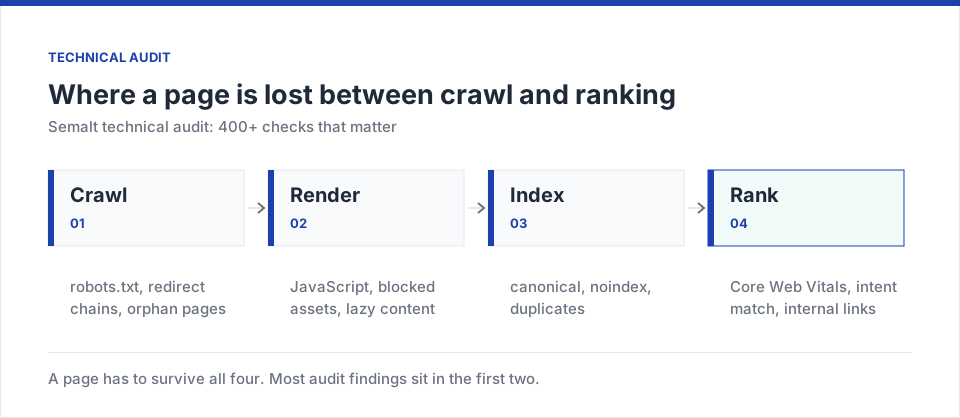
Classic SEO crawlers come from an era when HTML was static, bots didn't need to render, and search results were ten blue links. In 2026 the reality is different. Google renders every page with a current Chromium version, uses Interaction to Next Paint (INP) as an official Core Web Vitals signal, requires structured data for every rich results format, and considers E-E-A-T signals you cannot see in a single HTML line.
An audit with only 120 checks can find basic errors like a missing H1 or duplicate meta descriptions. But it doesn't see whether the price list on a trade contractor's page ends up empty after JavaScript rendering because a cookie banner blocks content injection. It doesn't see that a chat widget pushes mobile INP into the 400 ms zone. And it doesn't see that a Product schema block is missing a new required field that Google introduced in April.
The Semalt audit was built to close exactly these gaps. It combines a classic HTML crawl, a headless Chromium rendering pass, CrUX field data and a continuously updated schema validator that adopts changes from the schema.org changelog within 24 hours.
The 7 check categories at a glance
Chromium rendering: what classic crawlers miss
One of our clients in Schwabing, a dental group with eight sites, had a mysterious traffic drop in 2026. Screaming Frog found nothing. Sitebulb found nothing. Both tools crawl HTML by default and render JavaScript only on request. When we ran the Semalt audit, the issue was identified in 12 minutes: the client's new cookie consent solution loaded before the actual body content and hid the entire price list via display:none until the user actively accepted. To Google, which renders without consent, the page was „almost empty“. The client lost 34 % of organic traffic in three weeks.
Semalt's rendering runs in a headless Chromium instance with a German IP, German language and no accepted cookie consent — exactly how Google renders in Germany. It measures visible content after JavaScript, compares to the initial HTML, and flags every significant difference (text delta > 15 %). This is the check that produces the most critical findings among DACH clients.
Common DACH trap
2 out of 3 cookie consent solutions we see in Munich (usercentrics, CCM19, Cookiebot) are misconfigured and block content for bots. The Semalt renderer detects this automatically and suggests the correct configuration.
Core Web Vitals from the field, not the lab
Typical INP violations on DACH clients (mobile)
Lab data from Lighthouse is useful for development but not for SEO decisions. Google evaluates Core Web Vitals exclusively on the basis of the Chrome User Experience Report (CrUX) — that is, anonymised field data from real users at the 75th percentile. The Semalt audit imports this data for every indexed URL when traffic allows, and falls back to origin-level CrUX for niche URLs.
The most important metric in 2026 is INP (Interaction to Next Paint), which replaced FID as an official signal in March 2024. INP measures not only the first click but the worst interaction during the entire session. On Bavarian SME sites we find INP violations most often in three places:
- Chat widgets (Zendesk, Intercom, Userlike): load ~350 KB of JS and block the main thread when opened.
- Cookie consent triggers: consent itself is often an interaction with > 300 ms INP due to synchronous re-renders.
- Map widgets (Google Maps iframe vs. own Leaflet instance): first map interaction often in the 500-800 ms zone.
The Semalt audit shows for every URL the three interactions with the worst INP, the triggering JavaScript handler, and a concrete code suggestion for fixing it (e.g. requestIdleCallback, event delegation instead of inline listeners, or lazy-loading the chat widget 3 seconds after idle).
Schema validation against the current spec
Structured data in 2026 is no longer an optimisation but a baseline requirement for every rich result — from recipes to dentist locations to price comparisons. Google introduced nine new required fields in the first six months of 2026 alone (Product-Merchant, LocalBusiness-openingHoursSpecification-extended, Event-organizer-chain) and deprecated three property names.
Google's Rich Results Test shows errors, but always per URL and without batch mode. A client with 3,000 product pages cannot work through that manually. The Semalt audit validates all structured data across the entire site in a single pass, groups errors by schema type and root cause, and flags required fields that Google will enforce within the next 30 days.
What's especially important in 2026
For Munich trade, hospitality and services businesses: LocalBusiness.hasOfferCatalog and Service.termsOfService have been required since June to appear in the local pack. We currently see > 60 % of Munich SME sites failing to set these fields.
Prioritisation by business impact, not error count
The most common mistake SEO teams make on a first audit is naive prioritisation: „we have 12,743 findings, let's start with the critical ones“. The problem: the count tells you nothing about how much revenue or traffic is actually affected. A broken link on an imprint page and a broken link on the most visited landing page are weighted equally in classic tools.
Semalt prioritises by an impact score that combines three factors:
- Traffic volume of the affected URL (from the connected Analytics module).
- Position × CTR curve: a URL sitting in striking distance (pos. 4-10) gains more from a fix than one already at #1.
- Conversion value: if a CRM or shop is connected, expected pipeline value is factored in.
The result is a prioritised list that for a typical Munich Shopware client looks like this: 45 URLs covering 78 % of potential impact. Instead of grinding through thousands of findings, you prioritise the handful that unlock real revenue.
An audit is worthless if it only tells you what's broken. It has to tell you what to fix first, because it unlocks revenue. That's why we built our own prioritisation engine in 2024 instead of adopting the standard CVSS logic.
Sr. Product Manager Audit, Semalt — podcast „Search Central Live“ 2026What breaks more often in DACH than elsewhere
Two years of Semalt audits on DACH clients have shown a pattern: some errors are noticeably more frequent here than internationally. Top 5:
- Cookie-wall blocking: 61 % of audited sites hide relevant content from bots (see above).
- hreflang asymmetry between DE-DE, DE-AT and DE-CH: 44 % of multi-country sites have incomplete clusters.
- Umlauts in URLs, mixed with transliteration:
/münchen/and/muenchen/coexist as duplicates without a canonical. - PDF invoices indexed: legacy WooCommerce and Shopware setups expose customer invoices via crawlable URLs.
- Missing schema translations: LocalBusiness in DE, but rich-snippet example values in EN.
All five are reliably detected by the Semalt audit and shipped with concrete code examples (TYPO3, Shopware, WordPress, Contao) for the fix.
Cookie-wall detector
Renders like Google in Germany (no consent) and flags content missing from the DOM or hidden with display:none.
DACH language rules
Checks umlauts in URLs, hreflang between DE-DE / DE-AT / DE-CH, transliteration duplicates and German character encoding.
Schema live-sync
The validator pulls changes from the schema.org changelog within 24 h — no manual updating required.
Business impact score
Prioritisation by traffic × CTR curve × expected revenue. Instead of 12,000 findings you get a 45-URL list.
First audit in 8 minutes
Add the domain
After logging in at semalt.com/authorize, enter the domain. Automatic verification via DNS-TXT or HTML file.
Crawl configuration
User-agent (Googlebot pattern), max URL depth, rate limit (respects robots.txt) — defaults work for 95 % of clients.
Crawl runs
Under 8 minutes for sites up to 10,000 URLs. About 40 minutes for 100,000 URLs. Rendering runs asynchronously in a separate queue.
Continuous audit
Weekly delta audits run automatically. Changes are reported via email, Slack or Microsoft Teams.
More in this series: Semalt Analytics: what GA4 hides from you, Semalt AutoSEO: on-page fixes without a dev, Semalt: backlink gap, keyword gap, alerts.
FAQ
Does it replace Screaming Frog or Sitebulb?
For one-off audits, not necessarily. For continuous monitoring, and for the combination with Analytics and rank tracking, yes. Many clients keep Screaming Frog for specialised crawls (e.g. log-file analysis) and Semalt for the strategic view.
How much load does the crawl put on the site?
By default, a maximum of 5 concurrent requests with a minimum pause between requests. The crawler respects Crawl-Delay in robots.txt. On larger sites parallelism scales up to 20 requests if server response times stay < 500 ms.
Are login-protected areas crawled?
Only if you actively provide credentials. By default the crawler respects noindex and login barriers. There is an HTTP-Basic-Auth mode for staging environments.
How does JavaScript detection work?
Every URL is loaded in two modes: HTML-only (fast) and Chromium-rendered (slower but with the full DOM after JS execution). If both modes show significantly different content volume, a warning is raised.
Can I customise the 400+ checks?
Yes. Enterprise clients can define their own rules (e.g. „no <div> with a class name matching debug-* in production HTML“). For the standard tier the 400+ rules are fixed, but each can be enabled/disabled per segment (URL pattern).
What happens to the raw crawl data?
It's stored for 30 days in EU data centres (Frankfurt, Amsterdam) and then automatically deleted — unless you enable a longer retention period. The DPA gives you the option to delete raw data immediately and keep only aggregates.
An audit with 400+ checks in 2026 is not a luxury option but a necessity if you're competing against larger players in the DACH market. The business-impact score ensures the right errors get fixed first.
The next practical step
Run a free audit on your top 100 URLs. Within an hour you'll see what Google has been overlooking on your site for months.
Start an audit →