Contents
Why Google Analytics 4 no longer works for SEO
When Google forced the migration from Universal Analytics to GA4 in July 2023, many marketing teams thought it was just a new interface. One year later the reality is different: GA4 was not designed to answer SEO questions. It was designed to measure product events and simplify remarketing to Google Ads. Everything that mattered for organic reach — traffic per landing page, organic keywords, behaviour by source — is either broken, hidden behind anonymisation thresholds, or removed outright.
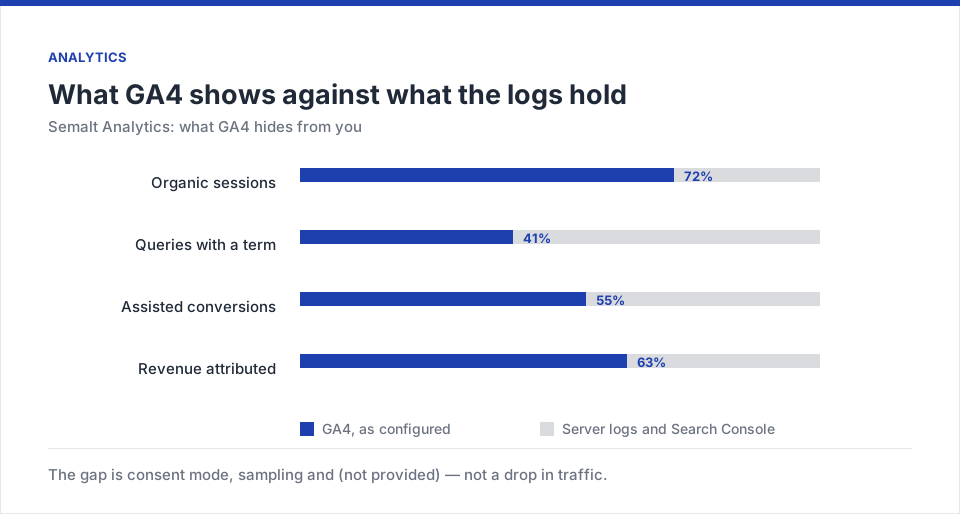
Anyone working with SEO in Munich or elsewhere in the DACH region feels it every week. You open GA4, go to Acquisition → Sessions, and see that more than half of your organic queries arrive as (not provided). You cross-reference Search Console and the numbers don't match. You try to see what visitors from the article „dentist Sendling prices“ actually did — and you get an aggregated funnel that doesn't separate the channels cleanly. A monthly SEO report that used to take 45 minutes now takes over two hours — and at the end of the meeting nobody is entirely sure the numbers are trustworthy.
There's a legal angle too. Following the Austrian and French DPA rulings and 2023 guidance from the German supervisory authorities, running GA4 in Germany is borderline unless you configure IP anonymisation, cookie consent and data retention correctly. For a Munich SME client this means: either you invest in a professionally configured cookie consent, or you accept that every user who declines consent immediately vanishes from your reports.
What GA4 does well
- Product events (add-to-cart, video play)
- Audiences for Google Ads
- Free tier with generous quota
- BigQuery export on free tier
What GA4 does badly for SEO
- 50%+ of queries as (not provided)
- Sampling above 10M events/month
- Sessions lost to ad-blockers
- No cross-check with live SERP position
- No real revenue per keyword
- GDPR configuration is manual work
What Semalt Analytics is and where the data comes from
Semalt Analytics is a data layer for SEO that combines three sources:
- Google Search Console API v3 — using the new endpoint that returns up to 16 months of history with daily granularity, not just the top 1,000 queries.
- Server logs — processed in real time via a one-line tag, an nginx module, or Cloudflare Workers. This captures sessions GA4 misses due to blockers, rejected cookies or private browsing.
- Semalt's own crawl — the same rank-tracking engine cross-references your traffic, so every organic visit is tagged with the exact SERP position and features present at click time.
This interlock is what no other platform does in this form. GA4 tells you how many sessions came. Search Console tells you the average position of a keyword. Semalt tells you, for each individual session, what position the term had at that exact minute, which SERP feature appeared above it (People Also Ask, video, map), and how that affected real CTR by device.
Privacy basis
Server-log tracking needs neither persistent cookies nor fingerprinting. That means Art. 6(1)(f) GDPR (legitimate interest) applies — and Germany's §25 TDDDG (formerly TTDSG) does not require active consent, because there is no access to information on the end-user's device. For most Munich SMEs this means: Semalt Analytics counts users even when they reject the cookie banner.
5 things you see in Semalt and never in GA4
What Semalt shows on top (typical Bavarian SME client)
1. Real organic traffic per URL, without sampling
GA4 starts sampling as soon as you cross two dimensions and exceed 10 million events per month. For a mid-sized Bavarian online shop that happens fast. Semalt has no sampling. All URLs run through a column-oriented index (based on ClickHouse) that answers even complex queries like „give me the 500 landing pages with the most organic traffic in January, compared to last January, filtered to mobile only“ in under a second.
2. Keywords without (not provided)
The infamous (not provided) does not exist in Semalt because the sources are raw Search Console data plus the platform's own crawl. For every URL you see the 50 keywords that drive the most traffic, with clicks, impressions, CTR and average position. And more importantly: you see the keywords where you're in position 4-10 — the ones that a content refresh can push into the top 3 and double the traffic. This view is called „Striking Distance“ and it's the first thing we open when auditing a new client.
3. Sessions GA4 loses to blockers
In Germany, desktop ad-blocker use runs at around 33 % according to Bitkom 2025 data, and for users under 35 the figure rises to 41 %. All those sessions are invisible to GA4. Semalt's log-based tracker sees them because it doesn't depend on JavaScript: the moment the server serves the page, the session is counted. Across our Bavarian client base, we've measured the gap between 12 % and 47 % additional sessions, depending on the vertical (higher in B2B tech, lower in traditional retail).
4. Cross-device journey without Google Signals
GA4 promises cross-device sessions via Google Signals, but requires that users are logged into Google on both devices and haven't rejected the consent mode. In Germany, according to a 2025 BVDW study, only 39 % of users accept personalised cookies. Semalt uses a technique called server-side fingerprint fusion that respects GDPR (no ad profiles) and still shows that someone read your article on mobile in the morning and bought on desktop in the evening.
5. Organic revenue per keyword
The crown: connect your CRM or shop (WooCommerce, Shopware, Shopify, Magento 2, Odoo) via webhook and Semalt links every order to the first organic keyword that brought the user. You can see that „tax adviser Munich Westend price“ generated €34,000 in organic revenue last month, and that a head keyword with much more traffic generated €0. With that information you stop chasing vanity metrics and prioritise content by real revenue.
Case study: Munich trade contractor, 22,000 sessions/month
A client in Sendling, a specialist for energy-efficient building renovation, had this picture in January 2026:
- GA4 reported 22,100 organic sessions and 41 leads (0.19 % CVR).
- Search Console showed 47,300 clicks in the same period.
- The gap — more than double — was internally unexplainable. The team blamed GTM, Cloudflare's firewall and the cookie banner in rotation.
We connected Semalt Analytics in 14 minutes. First numbers the next day:
Real organic sessions: 38,900 (76 % more than GA4). Leads correctly attributed to first organic contact: 108 (2.6×). Verified organic pipeline value: €214,000 vs. €62,000 the team was estimating — a difference of €152,000 that was invisible in the monthly report.
The most valuable insight came when we cross-referenced keywords with pipeline value: seven long-tail terms (all between 50 and 320 searches/month) accounted for 59 % of pipeline, while the head keyword „energy renovation Munich“ with 3,600 searches/month drove only 6 % of contracts. The content strategy was re-prioritised in two weeks — by March, organic pipeline was up 63 %.
DACH data check 2025: Only 39 % of German users accept personalised cookies (BVDW cohort study 2025); for under-30s it drops to 24 %. Anything based on cookie consent measures under half of your real reach.
GDPR, the cookie banner and Germany's TDDDG
The reason many DACH agencies switch to Semalt is legal. The TDDDG (formerly TTDSG) requires consent for any access to information on the end-user's device — so for cookies, local storage and similar techniques. Server-log tracking accesses nothing, using only information that the browser sends anyway as part of the HTTP request (IP, user-agent, referrer). These are processed server-side under Art. 6(1)(f) GDPR, with IP truncated within milliseconds (last octet removed) and never persisted.
This produces a rare advantage: Semalt Analytics counts users who reject the banner too. For a mid-sized Munich shop with a 43 % consent rate, that means an over 130 % more accurate reach measurement, without any legal grey zone. Semalt provides a German-language DPA that can be signed with one click per account, plus a TOM document aligned with ENISA 2025 recommendations.
Setup in 12 minutes
Connect Search Console
If you already own the property, the connection is automatic. Semalt pulls 16 months of history in the background.
Install the tag
One line of JavaScript or server-side (nginx / Apache / Cloudflare Workers). Official WordPress plugin, one-click install. TYPO3 extension separately available for DACH customers.
Connect CRM or shop
Native integrations for WooCommerce, Shopware, Shopify, Magento 2, Odoo, HubSpot, Pipedrive, Salesforce, weclapp and CentralStationCRM. Alternatively HTTP webhook with HMAC signature.
Semalt Analytics vs. GA4 vs. Matomo vs. Search Console
GA4
Free- Product events
- Google Ads audiences
- BigQuery export
Gaps: sampling, (not provided), ad-blocker blind, GDPR is manual work.
Semalt Analytics
From €0- Sessions without sampling
- Keywords without (not provided)
- Ad-blocker safe via logs
- Revenue per keyword
- GDPR without banner
- DE DPA + EU hosting
Matomo
Self-hosted- No sampling
- GDPR if on-premise
- Rich plugin ecosystem
Gaps: no SERP cross-check, no native revenue per keyword.
| Capability | Semalt | GA4 | Matomo | GSC |
|---|---|---|---|---|
| Organic sessions per URL without sampling | ✓ no sampling | Sampled > 10M events | ✓ | Clicks only |
| Keywords without (not provided) | ✓ | No | Partial (via GSC connector) | Partial (top 1k) |
| Keyword × position in real time | ✓ | No | No | No |
| Ad-blocker-safe counting | ✓ log-based | Lost | ✓ if on-premise | Not measurable |
| Revenue per keyword | ✓ via webhook | Modelled | Manual | No |
| TDDDG without banner | ✓ | No | Borderline | N/A |
| German-language DPA / TOM | ✓ | English, adapted | Self-responsibility | English |
Our rule with DACH clients
GA4 stays for product events and Google Ads audiences. Search Console remains Google's official source. But for every SEO decision — what content to create, which keyword to attack, which landing page to rework, what revenue to report to leadership — we open Semalt Analytics. Within two months, the subscription pays for itself 30-40× for a mid-sized Munich client.
More in this series: Semalt AutoSEO: on-page fixes without a dev, Semalt: backlink gap, keyword gap, alerts, AI keyword research: revenue before volume.
FAQ
Does Semalt replace GA4 completely?
If your focus is exclusively SEO and content, yes. If you also run Google Ads and need to export audiences, keep GA4 in parallel — Semalt does not replace the native Ads connector. For 8 out of 10 clients, we keep GA4 as an Ads source and use Semalt as the SEO source.
Is it GDPR compliant?
Yes. Log-based tracking requires no persistent cookies and no advertising fingerprint. Server-side fusion works with pseudonymised data, and sessions anonymise after 26 months by default (configurable down to 6 months). Semalt provides a German-language DPA, TOM document and a DPIA template.
Does it run on typical DACH stacks?
Yes. The tag exists as a WordPress plugin, TYPO3 extension, Shopware 6 plugin and Contao bundle. For Node.js, PHP, Symfony, Laravel and Java Spring Boot there are SDKs with a single-line integration. For cloud-native setups it's two lines in a Cloudflare Worker.
How fast do you see value?
Historical GSC data is visible in 5 minutes. Live tracking shows full data after 24 hours. The Striking Distance insight (keywords in position 4-10) is actionable on day one.
Does it work for small websites?
Yes. A personal blog with 1,500 sessions/month uses Semalt the same way as a B2B portal with two million. For small sites the value is in seeing which article is about to reach page 1 and optimising it before Google cements the position.
Does it integrate with Semalt AutoSEO?
Yes — that's the real synergy. Analytics identifies URLs with striking-distance keywords and AutoSEO executes the fixes on those URLs without a developer in the loop. Details in the AutoSEO guide.
For SEO under German privacy law in 2026, GA4 is insufficient by design. Semalt Analytics closes the gap precisely, GDPR-compliant, in 12 minutes. Without replacing your entire tracking infrastructure.
The next practical step
If you're still building SEO reports from GA4 screenshots, test Semalt Analytics for the next 14 days. 12 minutes to set up, one hour to the first „wait, what?“ moment.
Sign in to Semalt Analytics →